
Include Terrain Cross Section in Elevation View
When you use a drawing generation model that only includes terrains and no other objects to create a terrain cross section view, only the terrain line appears in the section view. You can add such a section view to an elevation view on a elevation drawing sheet to show the terrain surface when you select the Include terrain view option when updating a drawing sheet or views.
- If necessary, create a new drawing generation model that includes terrains only and no other objects. Read more in the instructions Edit the Drawing Generation Model Settings.
- Define the terrain cross section, and use the drawing generation model mentioned above. Read more in the instructions Define Cross Section Terrain View.
- Update the elevation view that has the same direction as the terrain section view. Read more in the instructions Update an Individual View.
- In the dialog box, select Update views, Update models, and Include terrain view.
The terrain cross section is included in the elevation view.
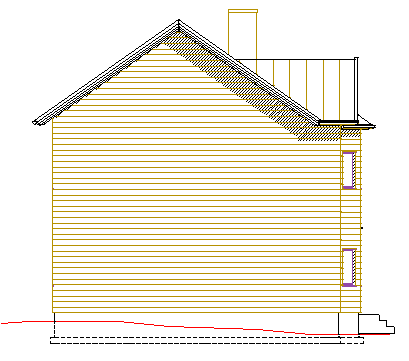
Note: Elevation views are usually created from the drawing generation model "elevations.vxm" or "model.vxm". Terrain should not be added to these drawing generation models if you want to include the terrain cross section to the elevation view.