
Roof Parameters When Detail Is Not Selected
Normally, when adding a basic roof, trusses, rafters or attic are selected as the roof structure. You can leave the roof structure undefined by selecting the No detail radio button in the parameter database view.
- Parameter set name
- A description text for the structure.
- Material code
- You can select the roof material from the list.
- Pitch
- The pitch is typed in a text window either as a ratio or in degrees. The ratio can be typed either as the ratio of the height and width of the slope or as a decimal number, for example 1/4 or 0.25. If the pitch is typed in degrees, the numeric value is followed by the letter A, for example 45A.
- Eave type, Fascia height
- You can create different eaves by changing the parameters Eave type and Fascia height:
-
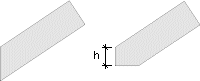
- Vertical
Fascia height = 0, Fascia height = h
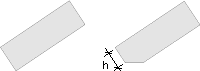
- Perpendicular
Fascia height = 0, Fascia height = h
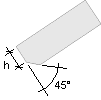
- 45 deg bevel
Fascia height = h
- Vertical
- Eave height
- The user must know the eave height, which is typed in the Eave height field. When trusses or rafters are selected as the roof structure, the eave height can be calculated using the other parameters.