
Edit Browser Settings
Edit the browser settings by selecting  Edit settings. The settings are browser-specific.
See also Edit Library Browser Settings.
- Case sensitive
- When the setting is enabled, the quick search and the exact search are case-sensitive.
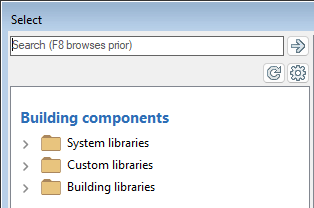
- Split tree by library sources
- When enabled, the component browser folders are grouped so that components from the system library, customer-specific library, and building-specific library are in their own main folders.
- Instant quick search
- Select one of the following:
- Not in use - The program only performs a search when you click the search button or press the Enter key.
- Search all fields - The instant quick search is enabled. The program searches for the character string from all fields. The program performs the search immediately after typing the character string without clicking a search button or pressing the Enter key.
- Search code - The instant quick search is enabled. The program searches for the character string from the document label. The program performs the search immediately after typing the character string without clicking a search button or pressing the Enter key.
- Classification tree includes
- Select what is displayed in the folder structure of the browser:
- History - You can use the history to find previously added documents.
- Favorites - You can add frequently searched documents to favorites.
- Default favorites - The option is only visible when default favorites have been saved.