
Show or Hide Machining Features
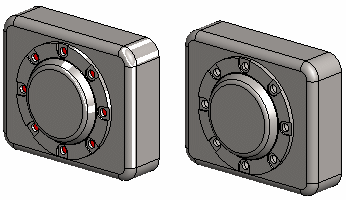
The geometry of a machining feature is highlighted in red color in part modeling and assembly.
The geometry of a machining feature can be set either visible or hidden in assembly.
- Select
 >
>  User Preferences >
  Drawings, Models.
 - Select the View tab.
- Select or unselect
 Show Machining Features.
 - Select OK.
Note:
- The machining features can be shown and hidden by pressing the M key.
- You can set machining features visible in the projection of a drawing.
 Projection Settings
 - To entirely hide a part or a component containing machining features and other geometry, select the Hide function.