
Copy Group in Rotation (2D)
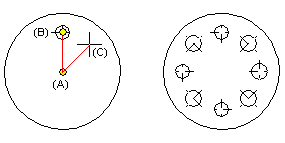
Copy a group around the center point at the desired angle value on the circle. You can define the angular distance in relation to a reference point either by clicking or by entering a degree value.
- Select Drawing |
 Group >
  Copy in rotation.
 - Click the group you want to copy polar.
- Click a center point (A).
- Enter the number of copies, and select OK.
- Select a reference point (B).
- Click the angular distance (C) in relation to the reference point.
You can also enter the exact angular distance in degrees by pressing the F8 key.
- Select Confirm.