
View Bend Data of Bent Pipes
General
- This function can be used to print data of the bent pipes added by the piping design.
- Bending data can be used with pipe bending machines.
- The function has been implemented for the needs of the Vertex G4 Plant program (Plant design), but it is also available to a limited extent in Vertex G4, at least if the model was first made with the plant design program.
- Note that the model must have bent pipes. If the model only has pipelines that use pipe curves, the function does nothing.
- Pipings made with Vertex G4 do not include a so-called position number, which can be used to distinguish separate pipelines. Pipeline positioning is only available in the Vertex G4 Plant program (Plant Design). If a bent pipe section does not have a line position, the program will still distinguish the lines based on the part numbers provided in the work drawing.
- You cannot edit the bending data list in such a way that the data is saved or printed.
View and print bent pipe data
- Select the function:
- Assembly | Tools |
 Parts list >
  Bending data of bended pipes.
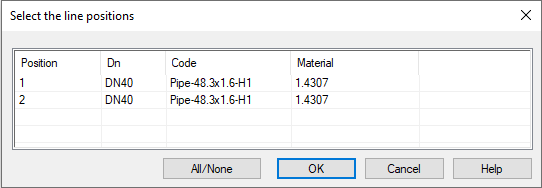
 - The function opens a list of pipelines with bent pipe sections.
- Assembly | Tools |
- Select the pipelines (positions) whose data you want to view or process.
- With the All/None button, you can select all lines at once or all lines off at once.
- Select OK.
- The program opens the BENDING DATA OF BENDED PIPES dialog box and lists the pipe data from the selected lines, i.e. the positions.
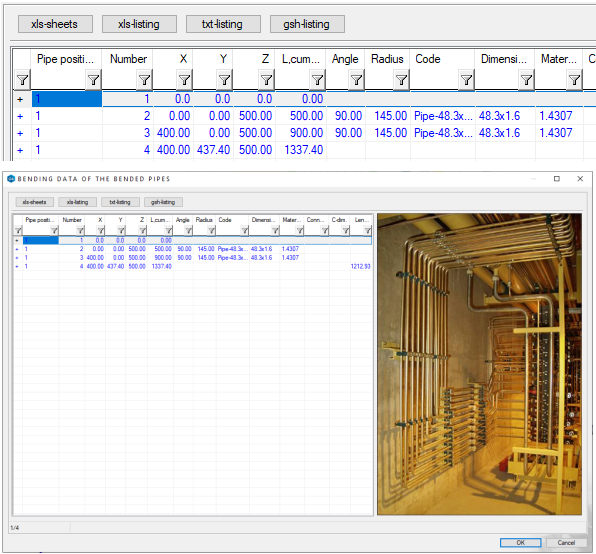
- The program opens the BENDING DATA OF BENDED PIPES dialog box and lists the pipe data from the selected lines, i.e. the positions.
- Create the desired listing using the buttons on the upper left side of the dialog box.
- Click OK or Cancel to close the dialog box.