
Building Area Schedule
You can add a table of building areas to the floor plan. If you modify the area, for example by moving the points of the hatch, the area in the table will update. The areas in the table are grouped by area type.
- Select Output |
 Building area schedule.
 - Click a location for the table in the floor plan.
By default, the table shows both the areas per building floor and the total areas.
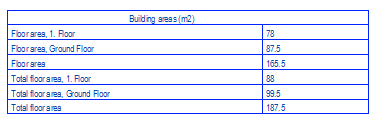
You can exclude all floor-specific areas from the table by editing the system settings. Add the keyword area_calc_param to the desired area set (floor area, total floor area, total floor area 250) and the parameter FLOORS_TO_BE_SHOWN for it. Enter the parameter value as a floor number that does not exist. In this case, only the total area is shown in the table. For example:

In the example table, the floor-specific areas have been excluded from the area sets total floor area and total floor area 250:
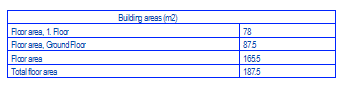
The floor description text shown in the table is read from the floor’s parameter set from the parameter BOM phase (BOM_PHASE). It is possible to read the description of the drawing-model pair as the description text by editing the system settings. Add the keyword area_calc_param to the desired area set (floor area, total floor area, total floor area 250) and the parameter USE_BOM_PHASE_IN_FLOOR_NAMES for it. Set the parameter value to 0.

- The drawing properties of the table (font, layer, text size, color, etc.) are defined in the system settings with the text name BLDGAREA.TEXT.
- The format of the table is defined in the f_area_schdl format file. The system file is located in the system/forms folder. If you want to edit the file, copy it to the custom/forms folder.