
Print Profile Cutting Lists
Cutting lists
The part data of profiles is added to all standard parts lists. In addition, cutting list outputs can be produced from the profiles:
- Cutting list
- A text-format cutting list that you can save in a location of your choice.
- Cutting list to Excel
- The cutting list is exported to Excel, where you can handle it with Excel tools.
- The function requires that Excel's so-called macro execution is allowed.
- In this output, similar profiles are grouped together and their total length and weight are calculated.
- Cutting list to drawing
- The cutting list is generated into a Vertex drawing.
 You can save a cutting list drawing to the drawing archive and it will be updated if the model and the profiles in it change.
- Cutting list+(XML).xlsm
- The cutting list is exported to Excel.
- The function requires that Excel's so-called macro execution is allowed.
- This output does not calculate height or weight sums.
Create a cutting list
- Open an assembly model or model drawing in the working window.
- Select the context-sensitive function Parts List.
- The program opens the dialog box Collect parts list.
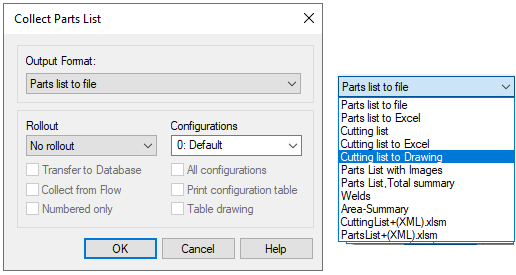
- The program opens the dialog box Collect parts list.
- Select the printing format:
- Cutting list
- Cutting list to Excel
- Cutting list to drawing
- Cutting list+(XML).xlsm
- Define the collecting parts list data in the dialog box.
- The roll-out functionality is only enabled if the sub-assembly in the main assembly has the feature Explode to parts list.
- Select OK.
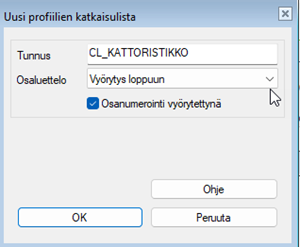
Updated cutting list to drawing rolled-out
-
When creating an updating cutting list, you will be asked whether to roll-out the cutting list.
- If you want to change the roll-out method, you must delete the cutting list and create it again.