
Cut the Top Edge of a Wall with an Arc
The top edge of an architectural wall can be cut with an arc-shaped component. A roof object cannot be curved in Vertex BD, but you can model a component that represents a curved roof with the 3D modeler. The feature is intended for straight walls in the architectural model (the wall must be vertical and non-curved). The clipping feature is available when the user/setup file contains the keyword:
set.wall.clip_tool= 1
A clipping component can be implemented by modeling a part model that consists of two features:
- A visible feature representing the roof.
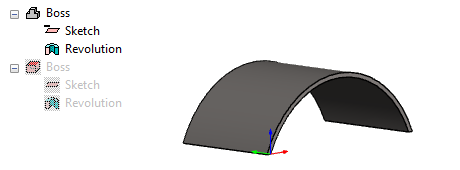
- A feature that has the Make tool property. The tool is used to cut the geometry of
the wall, so it should be larger than the wall area to be cut.
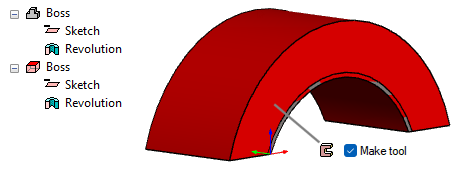
Save the part to the component library and add the component to the architectural model. The machining part is not visible in the model by default, but you can make it visible by pressing the M key. Pressing the key alternately shows and hides the machining part. The machining feature is highlighted in the model with red color.
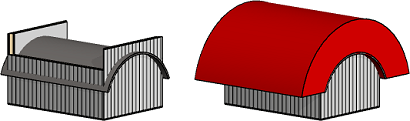
Cut a wall as follows:
- Select one or more walls.
- Right-click and select Clip with component.
- Select the component.
- Select Confirm.
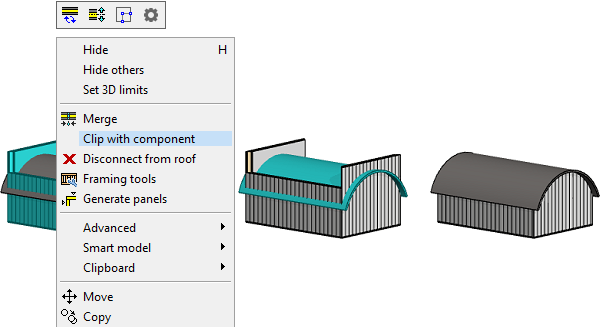
- Select a wall.
- Select Wall | Connection |
 Disconnect.
- The grip points of the wall remain according to the original shape of the wall.
- The cut shape is not inherited by the wall panel.