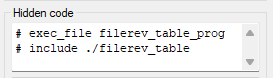
Hidden Codes from a Text File
In the Text dialog box, it is possible to read pre-defined hidden codes from a text file into the list below the Hidden code field. You can save hidden codes in the custom/setup/hidecode.txt file. Add hidden codes to the file line by line in the format:
Description Hidden code
The description appears in the list. The hidden code is updated in the Hidden code field.
An example of a hidecode.txt file:
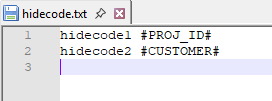
You can define a hidden code that contains multiple lines by adding a line to the hidecode.txt file in the format:
Description "Hidden code|Hidden code"
Add quotation marks around the hidden code combination and separate the hidden codes with a vertical bar.
For example:
hidecode1 "#exec_file filerev_table_prog|# include ./filerev_table
Lines are updated in the Hidden code field when you select the description from the list: