
Delete Pipeline Welds
With the function Remove pipeline welds, you can delete welds at once from the entire pipeline or from the selected section.
- On the Assembly tab, from the
 Welds menu, select the function
  Remove pipeline welds.
 - The program opens an auxiliary function menu in the upper left corner of the model window.
Options in the auxiliary function menu, starting from the top: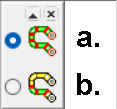
- This will target the entire pipe line.
- This will target the section between clicked parts. Click the part from which the section starts and the last part of the section.
- After clicking, the program will ask you to confirm to Remove the selected welds (Ok/Cancel)