
BD Archive and DesignStream Integration
DesignStream Interface
The DesignStream system is a browser-based data management system that can be connected to the Vertex BD program, see General Information About the DesignStream System. In the BD-DesignStream integration the documents to be downloaded from and restored to the DesignStream system are BD building models. In the DesignStream system, the building model is connected to a building that may be one of the following:
- Proposal/Sketch - A customer project that has not yet been confirmed.
- Project - A customer project that has been confirmed.
- House Model - A standard house model that can be used as a customer project.
- Building Group - A building group model that can be used in other buildings.
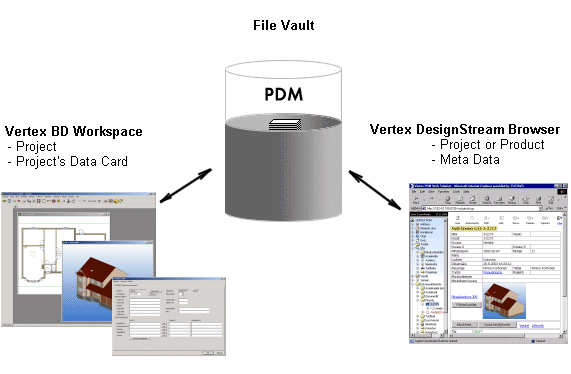
Building archives
In the BD-DesignStream integration the document archive of the DesignStream system is used in the same way as the archive of the Vertex BD software. The archive of the Vertex BD software is used during the design process, as a working archive. The building is copied from the DesignStream system to the designer’s local archive.
Starting a building
You can start a building in two ways:
- The building or project is created in the DesignStream system. The system will automatically generate an id for the project. When the designing of the building is started with Vertex BD, the id is retrieved from the DesignStream system.
- The building is created in Vertex BD. The building id is automatically generated and added to the DesignStream system.
Designing
The geometry of the building is modeled in the Vertex BD software. The building is transferred from the DesignStream system to the user's own Vertex BD workspace for modeling. To be able to modify the building, the designer must have the read and write permissions for the building. The folder and meta data of the reserved building are copied from the DesignStream system to the designer's local archive.
The building and its data card are modified in the Vertex BD software. At a suitable stage, the building is restored to the DesignStream system, after which other users can view and reserve it for editing, depending on their access rights.
Restoring the building saves the changes from the designer's workspace and releases the building’s reservation. The building folder and building data will be deleted from the designer’s local archive.
Old buildings
When implementing the DesignStream system, the existing buildings can be batch-transferred to the system, see Batch Transfer of Buildings to the DesignStream System.
Properties of the Integration
The properties of the integration are defined in the PDM keyword group. Editing the properties is the system administrator's task.
Please note, that the DesignStream Interface add-on option often includes customer fitting which is not presented in this user manual. Using the Vertex DesignStream system is presented in the software's own user manual.