
Add Holes to Hatch Automatically
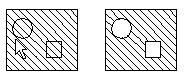
You can add all holes drawn onto a hatched area automatically. This requires that the edge lines of one or more holes exist. The edge line of the hole must be a closed line.
- Select Drafting |
 Hatch >
  Add holes automatically .
 - Select the hatch to which add the hole.
- Select Confirm.
 Select the hatch and the context-sensitive function Hole to hatch> Add holes automatically.
Note:
- You can add a hole into a hatch by using the functions in the Hatch dialog box.