
Add Holes to Hatch One by One
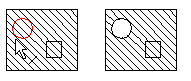
You can add holes to hatching by clicking the hole edge lines one by one. This requires that the edge lines of one or more holes exist.
The edge line of the hole must be a closed line.
- Select Drafting |
 Hatch >
  Add hole to hatch.
 - Select the hatch.
- Select one or more closed edge line of the hole.
- Select Confirm.
Adding Holes in Hatch Dialog Box
You can add a hole in a hatch, when you have drawn the hole as a closed edge line.
- Do either of the following:
- Double-click the hatch.
- Select the hatch, and select the contextual toolbar function
 Properties.
- In the Hatch dialog box, select Add.
- Indicate the edge line of the hole. If there are more than one holes in the same hatch, select the edge lines one by one.
- Select Confirm.