
Toggle the Model's Planes
General
- This function can be used to change the visibility of auxiliary planes of the selected model or models to the opposite. The function can be found on the ribbon, where the user is asked to select the model for which the function in question is performed. The function is also found when the user has selected models and opens a list of commands with the right mouse button.
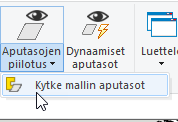
Functionality:
This function can be used, for example, as an aid with the Hide planes function. First, the user hides some auxiliary planes from the model using a previous dialog. After this, the user wants to hide all previously visible auxiliary planes and restore previously hidden auxiliary planes.
Note: In this function, hiding auxiliary planes follows the same logic as in the Hide planes function. That is, the hiding modes are valid with certain restrictions if the selected models are either local or link models. Similarly, if multiple instances of the same model are selected, the hiding/restore of the auxiliary planes will occur for all instances of the corresponding model.