Panel Assembly Data to Production Control System Transfer File
Framer, Controlling Production Line
Connection to the production control system is an add-on option of the Vertex BD program.
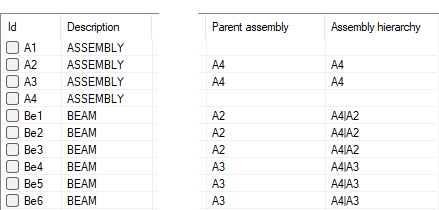
When you create the transfer files, the panel data is displayed in the columns in the dialog box. It is possible to present the panel assembly data in its own columns. The columns displayed in the dialog box are defined in the production line's setup file (for example custom/setup/vxpdsetup.txt) with the keyword dialog_fields.
You can add the following values to the keyword parameters:
| Value | Column | Description |
|---|---|---|
| 19 | Parent assembly | The column displays the label of the parent assembly to which the panel belongs. For example, A2. |
| 20 | Assembly hierarchy | If the parent assembly A2 is part of the higher-level assembly A4, the hierarchy is presented in the column in the format A4|A2. |
For example:
dialog_fields= 2|4|7|8|11|3|5|14|19|20