
Customer-specific Building Data to Sync
Vertex Sync
Not all building data card information is exported to the Sync service by default when a building is synchronized.
The building ID, name, storage location, status, and description are always exported to Sync. In addition, the following fields in the PROREG database are exported:
- CUSTOMER
- ADDRESS
- ZIP
- CITY
- DATE_DELIVERY
- CONTR_NUM
- PHONE
- PHONE_MOB
- CUS_EMAIL
- FAX
- BLDG_NAME
- BLDG_CITY2
- BLDG_ADDRESS
- BLDG_CITY
- SQM
- TOTALSQM
- HELP_ROOMS
- BEDROOM
- GARAGE
You can also include other PROREG database fields in the synchronization by editing the SyncMetaDataConfig.json file, which is located in the custom/setup folder, for example:
C:/vxbd/custom/setup/SyncMetaDataConfig.json
If necessary, you can copy the file from the system/setup folder.
Open the SyncMetaDataConfig.json file in Notepad++, for example.
Add the desired fields to the file, for example:
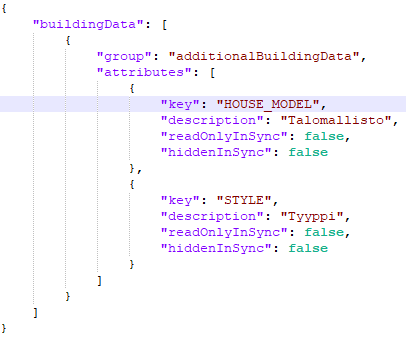
Save the file and restart Vertex BD.
When you synchronize the building again, the additional fields will also go to Sync.
Note: All additional fields must also be found in the building data card format file (custom/setup/proj_form).