
Show Scanning View Locations
Point clouds
To view the locations of the scanning points in the point cloud model, select Point clouds | Tools |  Views > Show scanning view locations.
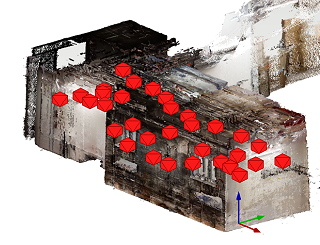
You can move from one scanning point to another by clicking on the symbol, which will open the Views from Scanning Points dialog box. The feature Show scanning view locations is selected in the dialog box. The selected view opens in the model window. In the view in the model window, the program draws nearby scanning points with larger symbols than the distant ones.