
Slab Conversion Rule
IFC Converter
Define a rule for converting IFC slab to Vertex BD floor, ceiling or roof in the Create conversion rule dialog box. The conversion is performed using either the Convert IFC Objects to Vertex Objects or Convert the Selected IFC Object to a Vertex Object function.
- Select
- Click Select, and select a structure from the floor, ceiling or roof library to which the select IFC objects or the IFC objects that meet the search criteria will be converted.
- A) Offset
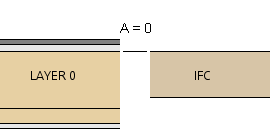
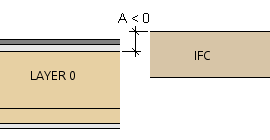
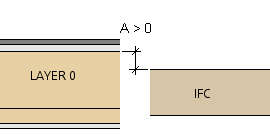
- Enter the distance of the top surface of the frame layer of the structure from the top surface of the IFC object.
- A = 0 - The top surface of the frame layer is at the same height as the top surface of the IFC object.
- A < 0 - The top surface of the frame layer is below the top surface of the IFC object.
- A > 0 - The top surface of the frame layer is above the top surface of the IFC object.
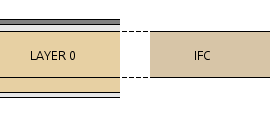
- Frame thickness from IFC model
- When the feature is selected, the thickness of the frame layer of the structure is determined by the thickness of the IFC object. The thickness of the other layers is consistent with the selected structure.
- Property conversions
- You can select an IFC object property to copy to the Vertex part during conversion. The property conversions you can select depend on the object type.